HUD Overlay
An always-on-top overlay that puts your current objective, and your conversation with Vega, on screen — in the game window, or inside a VR headset.
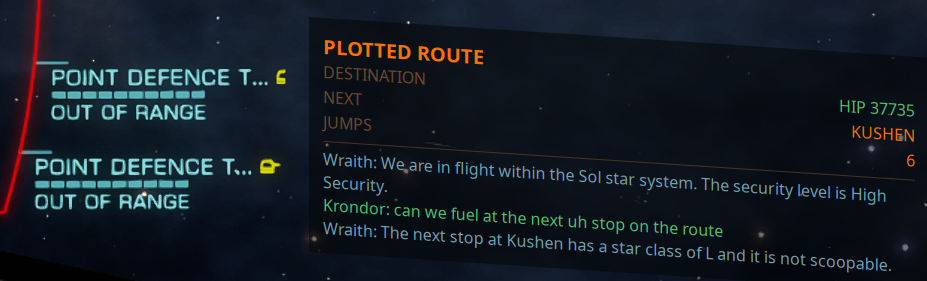
The overlay runs in its own process, so it does not compete with the game or the app for the interface thread.
The card is drawn to the cockpit's geometry rather than square to your monitor, so it leans the way the ship's own panels lean at that spot on screen — move it and the lean changes to suit. Its rows are slanted lines, which is why a value can sit noticeably lower than the label it belongs to: read each row along the slant, the same way you read the game's own readouts beside it. How far a value appears to fall depends on TEXT SIZE as well as placement — the lean is fixed by the cockpit, so smaller text means shorter rows and the same drop crosses more of them.
Turn it on with DISPLAY OVERLAY on the Vega tab, and configure it with OVERLAY SETUP next to it. The app remembers whether you left it on and restores it on the next launch.
If the overlay binary is missing from the distribution, the toggle says so in the diagnostics log. It will not claim an overlay that is not there.
What it shows
One objective card
Only one card fits, so the overlay shows the most important thing you are doing right now and switches by itself as that changes. There is nothing to configure.
Work you committed to always beats work the app volunteered, in this order:
| Rank | Card | Appears when |
|---|---|---|
| 1 | MASSACRE CONTRACT | You are running massacre missions — kills required, stack, reward |
| 1 | MISSION | You have accepted missions — the featured one's target, cargo or passengers, expiry and reward, plus what the rest of the stack is worth |
| 2 | TRADE ROUTE | A trade route is plotted — commodity, buy, sell, margin, leg n of m |
| 2 | CARGO OPPORTUNITY | Vega found a profitable buy/sell pair for spare cargo space on your journey |
| 2 | CONSTRUCTION SITE | You are hauling for a colonisation build — progress, what is outstanding, and what to load on the next run |
| 2 | COMMODITY FOUND / SHOPPING LIST / SELL CARGO | A commodity search found a market and a route is plotted to it — what to buy (or sell), stock and price |
| 3 | MINING | You have mining targets, a refinery fitted, and are not in supercruise — hold, limpets, targets |
| 3 | EXOBIOLOGY | Genuses are left to sample in this system — shown only while Announce discoveries is on |
| 3 | BOUNTY HUNTING | You are in a resource extraction site — site type, bounties in the hold, kills |
| 3 | CONFLICT ZONE | You are in a conflict zone — zone intensity, your side, combat bonds in hand |
| 3 | PLOTTED ROUTE | A route is set — destination, next system, jumps remaining |
The plotted route card takes a more specific title when Vega worked out the destination for you and the route still goes there: MATERIAL TRADER, TECHNOLOGY BROKER, INTERSTELLAR FACTORS, VISTA GENOMICS, REFUEL or OUTFITTING, with the station and type added. A plot somewhere else clears that detail, so an old errand can never claim the card.
The mission card features the mission whose destination is the end of your plotted route; otherwise the one that expires soonest.
The conversation
Under the card, the overlay types out the exchange as it happens — what you said, Vega's reply, and radio traffic — each in its own colour. Useful when you play with the voice turned down.
Overlay setup
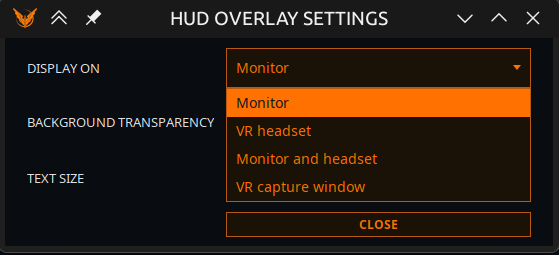
BACKGROUND TRANSPARENCY (0–100%) and TEXT SIZE (75–200%) are two separate controls on purpose. A single "opacity" slider would fade the text along with the backdrop, which is exactly what makes a dimmed overlay unreadable over a bright planet surface. Fade the background; leave the text alone.
Text colors
One colour picker per role, so you can tune the overlay for your cockpit colours or your eyes:
Objective title · Good · Warning · Critical · Labels · Your words · Ship AI · Radio traffic
Reset colors puts every colour back to the one the overlay ships with.
DISPLAY ON
| Mode | What it does |
|---|---|
| Monitor | A desktop window. The default. The card leans to match the cockpit, and the lean changes with where you place it |
| VR headset | A SteamVR overlay. Needs SteamVR running. If VR cannot be had it falls back to a desktop window, so you are never left with nothing |
| Monitor and headset | Both at once, fed identical data. Useful if you fly in VR but stream or record from the monitor |
| VR capture window | A plain, flat, opaque window for a capture tool to pin |
About VR capture window
This mode does not talk to SteamVR. Start your capture tool — Desktop+, OVR Toolkit, or Virtual Desktop — and pick the window named "EliteIntel HUD (VR capture)".
Why it exists: the SteamVR mode hands the compositor a full texture per typed character, and on a streamed headset that has been reported as a real frame-rate cost. A capture tool takes the window on the GPU on its own schedule, and gives you placement and curvature controls this app does not have.
It is a separate mode rather than "point your capture tool at the Monitor window", because that window leans, is see-through, and is a tool window — which capture pickers filter out entirely.
POSITION IN HEADSET
Eight placements: Above, Above right, Right, Below right, Below, Below left, Left, Above left.
The HUD is fixed in front of your seat and does not follow your head. The direction you pick is measured from where you face after SteamVR's Reset Seated Position — so recentring your view moves the HUD along with the cockpit, which is what you want. Look away and the HUD stays where you left it, exactly like a physical panel.
Reading it in another language
Card labels follow the app's language, and numbers are grouped the way that language groups them. Names the game supplies — systems, stations, commodities — pass through untouched.
Community 👉Matrix👈