Discovery Assistance
This guide describes the discovery and exploration features in EliteIntel. The sections below cover undiscovered system detection, surface exploration, exobiology navigation, coordinate routing, and system-wide tracking.
Exploring the Unknown
Ask the app to enable discovery announcements. Same as always speak naturally, but be precise about what
you mean.
When entering an undiscovered system:
- Undiscovered Systems: Upon exiting hyperspace, EliteIntel checks whether the system has been previously discovered. If it is uncharted and discovery announcements are enabled, EliteIntel announces the new discovery.
- Honk If auto-honk is enabled, your ship will perform the preliminary frequency sweep on exit from hyperspace.
- FSS Scanning: Fly a safe distance from the parent star. Say
Open FSSorScan the sytemor something to that effect and FSS screen will be opened for you. Perform your scans as usual. The app will announce if you find something worth finding such as high-value worlds, or bio/geo signals. - Post-Scan Analysis: After identifying all bodies in the system, EliteIntel can analyze the data on your request.
- Ask
Which planets have bio signals?orAny geological sites?orIs planet X landable. Note for planet names you can skip the star name prefix. For exampleStarName-23has a planetStarName-23-2byou can just askis bravo two landable?. - If there are bio signals present, you can ask the app to perform prelimenary biome
analysis
analyze biome for this star system. the app will attempt to guess what exo-bio might be present based on what we know about the organisms and their preferred habitats. This is an educated guess and not a gospel, so do a detailed scan of the planet and perform surface scans for the exo-bio colonies if you fancy.
- Ask
Surface Exploration
Exobiology Navigation
When collecting bio samples in challenging terrain, EliteIntel tracks tagged samples and guides you between them.
- Tag Samples: Fly low and slow over the terrain to locate bio colonies. Approach each colony and scan it with the Composition Analyzer to create a Codex Entry. Remain close to the sample when scanning. This logs the ship's coordinates in EliteIntel and may earn a credit reward. Tag all visible species before landing.
- Land: Find a landing spot within 2 km of the samples if possible. If no suitable spot is available within that range, EliteIntel will guide your SRV via GPS.
- Navigate to Samples: Say
Navigate to nearest codex entryorNavigate to next bio sample.EliteIntel routes you to the nearest tagged location. After scanning a species (for example, Frutexa), EliteIntel records the type. Subsequent navigation requests prioritize that species if additional tags of the same type exist. - Continue: Repeat until all scans are complete. EliteIntel provides continuous voice guidance during extended SRV traversal.
Display Overlay
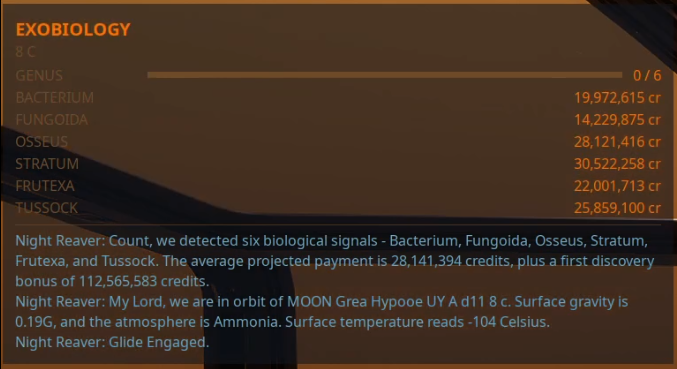
Note: EliteIntel uses coordinates from Codex tags. Remaining close to the sample during scanning improves coordinate accuracy. More tags provide more navigation options.
When a planet with bio signals is identified, EliteIntel provides surface exploration support:
- Detailed Surface Scan: After a detailed surface scan, EliteIntel gathers data including gravity, temperature, and available genera.
- Spotting and Scanning: Fly low over the surface. Locate biological specimens such as Fungoida or Frutexa, which may be found in terrain such as mountain ranges. Scan a specimen from the ship to create a Codex entry and potentially earn a credit reward. EliteIntel records the coordinates for that genus and variant.
- SRV Navigation: Find a landing spot near the scan points. Enter the SRV and say
Navigate to the nearest bio sample.EliteIntel selects the nearest tagged sample and provides bearing and distance. It provides spoken directions to within close range of the sample. - Smart Codex Management: Scan a sample with the bio scanner. EliteIntel removes the corresponding Codex entry for that genus within the colony range. Tag colonies far apart to avoid clearing multiple entries with a single scan. EliteIntel reports the minimum distance to the next sample and estimates the Vista Genomics payout for a complete set of three.
- Persistence Across Sessions: Progress is preserved between sessions. EliteIntel retains collected samples, remaining targets, and coordinates even after leaving the system. Exploration progress is saved until manually reset or the system's data collection is completed.
Returning to Finish the Job
If you have left a planet or the star system, progress is retained and can be resumed at any time.
- Orbital Navigation: As you approach the planet, request navigation from EliteIntel. It guides you from orbit to the Glide Zone, approximately 300 to 400 km from the target coordinates. EliteIntel provides bearing and distance to the Glide Zone threshold, not the surface target. Instrument flight is required for approaches on the dark side of a planet.
- Glide Assistance: Upon reaching the Glide Zone, EliteIntel prompts you to initiate glide and suggests a safe descent angle. The maximum safe angle is -35 degrees. If repositioning is needed for a safe glide angle, EliteIntel advises accordingly. After gliding, EliteIntel guides you to within 1 km of the target for landing.
- Surface Navigation: In the SRV, EliteIntel guides you to within 25 meters of the target coordinates.
Navigating by Coordinates
To navigate to specific coordinates, say Navigate to 23.456 latitude and -43.87 longitude. EliteIntel activates
navigation from orbital cruise or from the surface.
System-Wide Insights
EliteIntel provides system-wide tracking and analysis:
- Sample Tracking: Ask
What bio samples have we collected?EliteIntel reports collected samples, remaining targets, and locations by planet. This data persists across system re-entries. - Profit Estimates: Ask
What is the potential profit from this system?EliteIntel estimates earnings based on available scan data. - EDSM Integration: For discovered systems, EliteIntel queries EDSM for available data. If data is found, you can query EliteIntel about system details.
- Route Analysis: EliteIntel can analyze a planned route, reporting the number of jumps remaining, scoopable stars, and actual travel distance versus straight-line distance.
Community 👉Matrix👈