Commander Tab
 Who you are, which
voice each hull in your fleet speaks with, what your ship does for you automatically, what Vega
tells you about without being asked, and the Exo-Mastery catalogue.
Who you are, which
voice each hull in your fleet speaks with, what your ship does for you automatically, what Vega
tells you about without being asked, and the Exo-Mastery catalogue.
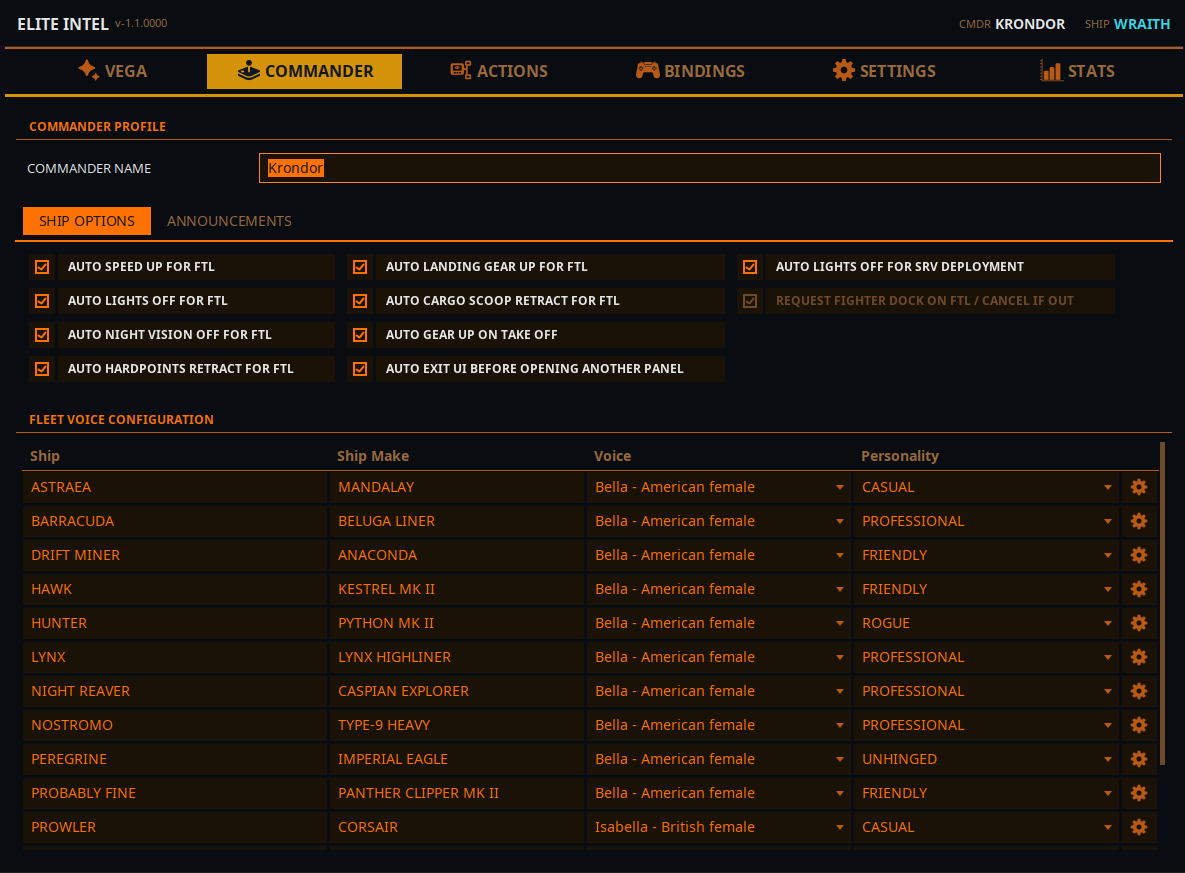
The Commander Profile strip sits at the top; below it are four sub-tabs: Fleet Management, Global Ship Settings, Announcements and Exo-Mastery.
Commander Profile
Commander Name — the name Vega uses for you once in a while. Use it if Vega mangles your in-game handle, or if you simply want to be called something else. Saved when you press Enter or click away.
Address Me — when off, Vega never addresses you at all: no name, no rank, no title.
The journal folder lives in Settings → Common, and the bindings folder in the Bindings tab.
Fleet Management
One row per ship you own, followed by your fleet carrier and squadron carrier if you have them. Elite Intel discovers your fleet from the game journal; you never add ships by hand. If you fly several commanders on one PC, the list follows whichever commander is loaded in the game.
| Column | Notes |
|---|---|
| Ship | Your ship's given name (for a carrier, its name and call sign) |
| Ship Make | The hull type, or Fleet Carrier / Squadron Carrier |
| Voice | Click to pick. Changing it immediately plays a line in that voice so you can audition it |
| Personality | Professional · Casual · Friendly · Unhinged · Seven of Nine · Mouthy Merc · Your Ex-Boyfriend · Your Ex-Girlfriend · Rogue |
| ⚙ | Opens that ship's settings (see below) |
About the voice list. Every voice of the speech engine selected in Settings → AI Services is offered, male and female alike — the voice you pick also decides whether Vega speaks of itself as he or she on that ship.
- Kokoro and Supertonic 3 (local) — labelled
Name - accent. - Google (cloud) — labelled
Name - accent · HDor· Standard. In English the accent tells the voices apart. In every other language each voice is synthesised in that language, so the label shows gender and the quality tier instead of a misleading English accent. - Microsoft Edge (cloud) — labelled
Name - accent.
Switching the speech engine resets every ship's voice to the new engine's default. Your ship personalities are kept. The app asks before doing it.
Carrier rows have a voice and nothing else — a carrier is not crewed by Vega, so it has no personality and no settings. The voice is the one its traffic control answers on over the radio. Leave it on Random and a different controller answers each time; pick one and the audition plays as a radio transmission, because that is the only way you will ever hear it.
Ship Settings (the ⚙ button)
Per-ship settings, because a mining Python and a combat Corvette do not want the same behaviour. Changes are saved when you close the dialog with Back.
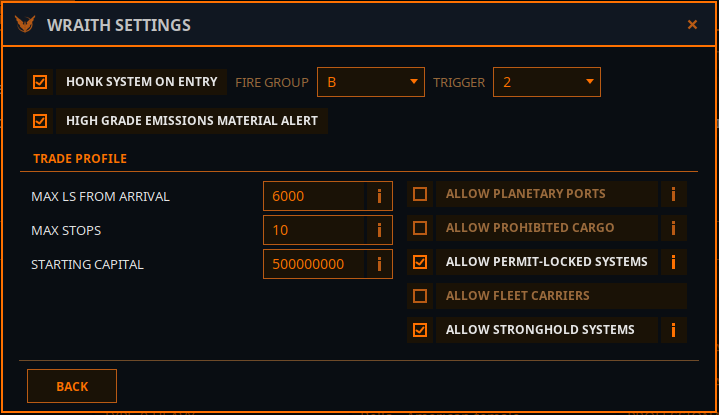
Honk system on entry — performs a discovery scan when you arrive in a system. Pick the Fire Group (A–H) and Trigger (1 or 2) your discovery scanner is mounted on. If your HUD is in Combat mode, Elite Intel swaps to Analysis, scans, and swaps back.
Vehicle bays — what you keep in each planetary vehicle hangar bay (Bay 1–4: Empty, Scarab, Scorpion or Rhino). The game's journal names the hangar but never what is inside it, so this is how "deploy SRV" opens the right bay — and knows whether the ship has to be landed (Scarab, Scorpion) or can hover (Rhino) first. All four bays are always shown, whatever hangar is fitted, so your choices survive a refit.
High grade emissions material alert — tells you when a High Grade Emissions signal in the system carries materials worth stopping for.
Trade Profile — the constraints Elite Intel obeys when it plots a trade route for this ship. Every one of these can also be set by voice: "change trade profile max stops four".
| Setting | Meaning |
|---|---|
| Allow Planetary Ports | Include surface ports in routes |
| Allow Prohibited Cargo | Include cargo that is illegal somewhere on the route |
| Allow Permit-Locked Systems | Include systems needing a permit |
| Allow Fleet Carriers | Include player fleet carriers as markets |
| Allow Stronghold Systems | Include Thargoid/power stronghold systems |
| Max Ls From Arrival | How far from the arrival star a station may sit |
| Max Stops | Number of legs in the route |
| Starting Capital | Credits the route planner may spend |
See Trade & Profit for how routes are flown.
Global Ship Settings
Automations Vega performs on your behalf, for every ship. Each one is a plain toggle that saves immediately. Useful for everyone, and genuinely enabling for commanders with disabilities.
| Toggle | What it does |
|---|---|
| Auto speed up for FTL | Throttles up before a jump |
| Auto lights off for FTL | Kills ship lights before a jump |
| Auto night vision off for FTL | Drops night vision before a jump |
| Auto hardpoints retract for FTL | Retracts hardpoints before a jump |
| Auto landing gear up for FTL | Raises gear before a jump |
| Auto cargo scoop retract for FTL | Retracts the scoop before a jump |
| Auto gear up on take off | Raises gear after lifting off |
| Auto lights off for SRV deployment | Kills lights when you deploy the SRV |
| Auto plot next neutron jump on cone boost | On a neutron route, plots the next neutron waypoint as soon as you have boosted through the cone |
Announcements
Everything Vega volunteers without being asked, in one place — a single screen to check when something is talking too much, or not enough.
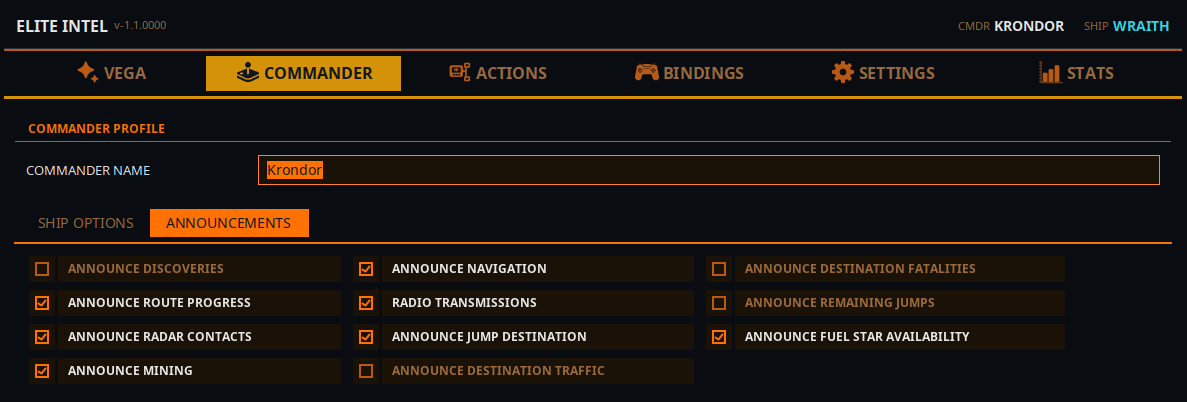
| Toggle | What you hear |
|---|---|
| Announce discoveries | Notable bodies, first discoveries, biological signals. Also drives the Exobiology card on the HUD overlay |
| Announce planetary approach | Facts about the body as you approach it |
| Announce radar contacts | Ships appearing on the scanner |
| Announce mining | Prospector hits and material finds for your mining targets |
| Announce cargo scoop pickups | What you just scooped |
| Announce navigation | Navigation events and arrivals |
| Radio transmissions | In-character radio chatter, spoken in distinct radio voices |
| Route announcements | Master switch for everything said around a jump. The toggles under it only work while it is on |
| ↳ Announce jump destination | What the next system is |
| ↳ Announce destination traffic | Traffic reports for where you are heading |
| ↳ Announce destination fatalities | Recent deaths in the destination system |
| ↳ Announce arrival | A line when you arrive |
| ↳ Announce remaining jumps | Jumps left on the route |
| ↳ Announce fuel star availability | Whether the destination has a scoopable star — spoken as part of the remaining-jumps line |
Most of these can also be flipped by voice ("turn off radar announcements", "all announcements off"), so the page re-reads them whenever you open the tab.
Exo-Mastery
A catalogue of star systems near the bubble whose planets carry high-value exobiology, crowd-sourced from Spansh.
- Press Enable Exo-Mastery. The catalogue downloads and imports, each half with its own progress bar.
- Once loaded, the page shows Star systems, Planets and moons, the Projected value of the whole catalogue, and how much of it you have Harvested.
- In flight, say "take me to the next exobiology site" and Vega plots a course to the richest system you have not sampled out yet.
Planets you finish are ticked off as you scan. Anything you sampled before installing Elite Intel can be written off by voice — "we have already sampled this body", or for a whole system, "flag this system as harvested".
Disable Exo-Mastery removes the catalogue from your computer, after asking. Planets you have already sampled stay recorded, so enabling it again later will not send you back to them.
Community 👉Matrix👈