Make Your Own Commands
A custom command is a macro: a list of steps — key presses, pauses, typed text, spoken lines — that runs when you say one of your phrases. Use one when the built-in commands do not do what you want, or when you do the same sequence of key presses over and over.
Custom commands live on the Actions tab → Custom Commands. This page walks through building two of them from scratch.
Before you start
- A language model must be running. The action key is generated by it, and your phrases are matched by it. Start services on the Vega tab first.
- Every control you use needs a keyboard binding. Elite Intel presses keys, so a control bound only to your HOTAS cannot be pressed by a macro. The Bindings tab shows what is missing, and Auto-Assign Missing Binds fixes it in one go.
Example 1: countermeasures in one breath
Goal: say "pop countermeasures" and get a heat sink, chaff and a shield cell, with Vega confirming.
1. Create the command
Open Actions → Custom Commands and press New.
2. Name it and write your phrases
Name:
CountermeasuresWhat you'll say: one phrase per line (commas work too):
pop countermeasures
deploy all countermeasures
defensive package
Write the phrases the way you would actually say them under pressure. Make them different from built-in commands — a phrase that already belongs to a built-in command ("deploy heat sink", "chaff") is rejected, because Vega could never tell the two apart.
3. Generate the action key
Press Generate. The language model turns your phrases into an English snake_case key such
as deploy_all_countermeasures. You cannot type it by hand — it becomes the name the model sees,
so it must be in a form the model can always repeat back. It is English even when your phrases are
not.
4. Add the steps
Press Add step for each one. In the step dialog pick the Type, then fill in what that type
asks for. The Binding list is labelled like the game's own Controls screen —
Ship controls / Cooling / Deploy Heatsink — and you can type in it to filter (try heat, srv,
chaff).
| # | Type | Value | Duration ms |
|---|---|---|---|
| 1 | Binding Tap | Deploy Heatsink | |
| 2 | Delay | 150 | |
| 3 | Binding Tap | Use Chaff Launcher | |
| 4 | Delay | 150 | |
| 5 | Binding Tap | Use Shield Cell | |
| 6 | Speak | Countermeasures away. |
Use Edit step, Remove step and the ▲ ▼ buttons to fix the order.
5. Save and test
Press Save. If something is wrong, a validation message tells you what — see Troubleshooting at the bottom of this page. The command now appears in the list.
Click its row, then Run, to test it without speaking. When it works, say it:
"Pop countermeasures." You can also type it in the game chat: @Vega pop countermeasures.
Example 2: a route to a place you visit often
Vega will not plot a route to a system you name aloud — names are where speech recognition goes wrong most. For a place you fly to regularly, a macro drives the galaxy map for you, the same way every time.
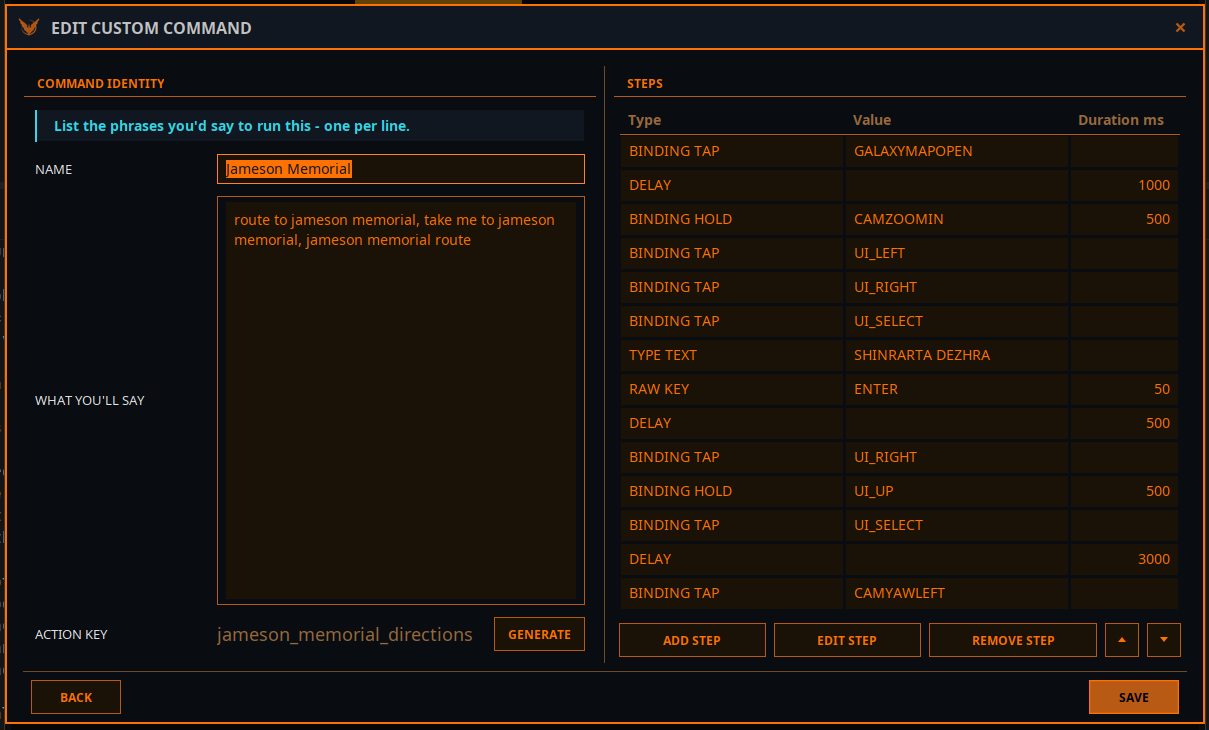
What you'll say: route to jameson memorial, take me to jameson memorial, jameson memorial route. Then Generate.
| # | Type | Value | Duration ms | What it does |
|---|---|---|---|---|
| 1 | Binding Tap | GALAXYMAPOPEN | Open the galaxy map | |
| 2 | Delay | 1000 | Let the map load | |
| 3 | Binding Hold | CAMZOOMIN | 500 | Zoom the map camera |
| 4 | Binding Tap | UI_LEFT | Move to the search field | |
| 5 | Binding Tap | UI_RIGHT | ||
| 6 | Binding Tap | UI_SELECT | Open the search field | |
| 7 | Type Text | SHINRARTA DEZHRA | Type the system name | |
| 8 | Raw Key | ENTER | 50 | Search |
| 9 | Delay | 500 | Wait for the result | |
| 10 | Binding Tap | UI_RIGHT | Move into the result panel | |
| 11 | Binding Hold | UI_UP | 500 | Run up to the top button |
| 12 | Binding Tap | UI_SELECT | Plot the route | |
| 13 | Delay | 3000 | Wait for the route to be plotted | |
| 14 | Binding Tap | CAMYAWLEFT |
To make one for another place, select this command, press Duplicate, then change the name, the phrases and the system in step 7, and Generate a new key. Duplicate deliberately leaves the phrases and key empty, so the two commands never sound alike.
Start such a macro from flight, with the galaxy map closed — the first step opens it, and on an already open map it would close it instead.
The step types
| Type | Fields | Use it for |
|---|---|---|
| Binding Tap | Binding | Press a game control once |
| Binding Hold | Binding, Duration ms | Hold a game control — throttle, camera, scrolling a menu |
| Delay | Duration ms | Give the game time: a panel opening, a map loading, a search finishing |
| Speak | Text | Have Vega say something — a confirmation, or a reminder of what the macro just did |
| Raw Key | Raw Key, Modifier, Duration ms | Press a key that is not a game binding: Enter, Escape, a letter. Duration is how long it is held |
| Type Text | Text | Type characters into the field that has focus — a search box, the chat line |
Prefer Binding steps to Raw Key. A binding follows whatever key the game actually uses, so the macro keeps working if you rebind the control. Use Raw Key only for keys the game has no binding for, such as Enter inside a text field.
Type Text goes wherever the keyboard focus is. Open the field first — a Binding step that opens a search box, or Raw Key: Enter to open the comms chat. Otherwise the letters arrive at your ship controls as key presses.
Tips
- Delays are the usual fix. If a step seems to be skipped, the game was not ready for it. Lengthen the delay before it, or move Key Input Pacing on the Bindings tab towards Slow — that adds a pause after every keystroke Elite Intel sends.
- Several phrases, distinct meaning. You do not have to say a phrase word for word; Vega matches by meaning. The more your phrases differ from other commands, the more reliably yours is chosen.
- Speak steps make macros feel like part of the ship, and tell you the macro actually ran.
- Share them. Export writes chosen commands to a file; Import reads one. Importing replaces your current set, but it is backed up first and Restore from backup brings it back.
- Check the startup line. When services start, Vega says how many custom commands loaded and how many failed validation.
Troubleshooting
| Message or symptom | What to do |
|---|---|
| Add at least one phrase above before generating a key. | Write at least one phrase first |
| Could not generate an action key. | The language model did not answer. Check the LLM readout on the Vega tab and try again |
| Phrase collides with a built-in action alias | That phrase already runs a built-in command. Reword it |
| Phrase collides with another custom command / Duplicate phrase | Two commands — or the same one twice — use that phrase. Change one |
| Action key collides with a built-in command / must be unique | Reword your phrases and Generate again |
| At least one step is required / … is required / durationMs must be positive | A step is missing its binding, text, key or duration |
| The macro runs but something is skipped | Add or lengthen a Delay before that step, or slow Key Input Pacing |
| Vega answers with something else | Make your phrases more distinctive, or run it typed: @Vega <phrase> |
| A binding step does nothing | That control has no keyboard binding — see the Bindings tab |
Community 👉Matrix👈